From Sketch to Launch in a Month: CPA Workflow Automation
Building an enterprise tax preparation system with document AI, multi-agent review, and automated client communications
Enterprise systems don't take eighteen months because the technology is hard. They take eighteen months because teams build for hypothetical future requirements instead of actual current needs.
Tax season at a CPA firm is controlled chaos. Thousands of documents flowing in: W-2s, 1099s, K-1s, Schedule Cs. Each needs to be classified, data extracted, entered into tax software, reviewed, and tracked through multiple stages before filing.
The firm we worked with was drowning. Staff spent most of their time on manual data entry. Documents got lost in email threads. Clients called asking for status updates because nobody knew where their return was in the process.
We built them a complete workflow automation system, from document intake to final filing, in four weeks. Here's what we learned about scope discipline and shipping things that actually work.
What we actually built (not what it sounds like)
Not a simple task board. A full enterprise system with six integrated capabilities:
Intelligent Document Classification
Custom-trained AI models that automatically identify and categorize tax documents: W-2, 1099-INT, 1099-DIV, 1099-MISC, K-1, Schedule C. The system recognizes them instantly. No more manual sorting through client uploads. Documents land in the right place automatically.
Structured Data Extraction
OCR combined with intelligent extraction pulls the actual data from documents: employer EINs, income amounts, withholding figures, dates. This data flows directly into tax preparation software. What used to take a preparer 20 minutes of typing now happens in seconds, with the system flagging anything that looks inconsistent.
Multi-Agent Review Workflows
Returns don't just sit in a queue. The system routes them through configurable review stages: preparer, senior reviewer, partner sign-off. Automated escalation when something's stuck. Quality checkpoints at critical decision points. Everyone knows exactly what they need to work on.
Automated Client Communications
The system proactively reaches out to clients. Missing a W-2? They get an email (and SMS if configured) asking for it specifically. Return moved to review? They know. Ready for signature? Link sent automatically. No more staff time spent on status update calls.
Secure File Handling & Audit Logging
Enterprise-grade security throughout. Encrypted storage, role-based access controls, comprehensive audit trails. Every action logged: who accessed what, when, what changed. Built for firms that need to demonstrate compliance.
CRM & Tax Software Integration
Bidirectional connections to major tax preparation platforms. Data flows in and out without manual transfer. The workflow board becomes the single source of truth, but it talks to everything else the firm uses.
The decisions that made it work
Custom Document AI Pipeline. We built a proprietary processing pipeline: OCR tuned for tax document formats, classification models trained on thousands of real documents, extraction algorithms that handle the edge cases (handwritten notes, poor scans, non-standard forms). This isn't off-the-shelf document processing. It's built for this specific domain.
Workflow Orchestration Engine. A flexible rule-based system that manages task routing, status tracking, and automated escalations. The firm can configure workflows to match their actual processes, with different paths for individual returns vs. partnerships vs. trusts. Quality controls and compliance checkpoints built in.
Integration Layer. Extensible APIs connecting to tax platforms and CRM systems. Real-time synchronization, no manual intervention required. When data changes in one system, it reflects everywhere.
Security & Compliance Framework. Encrypted data at rest and in transit. Granular access controls. Comprehensive audit logging. Built to support SOC 2, GDPR, and industry-specific requirements.
Why simplicity wins
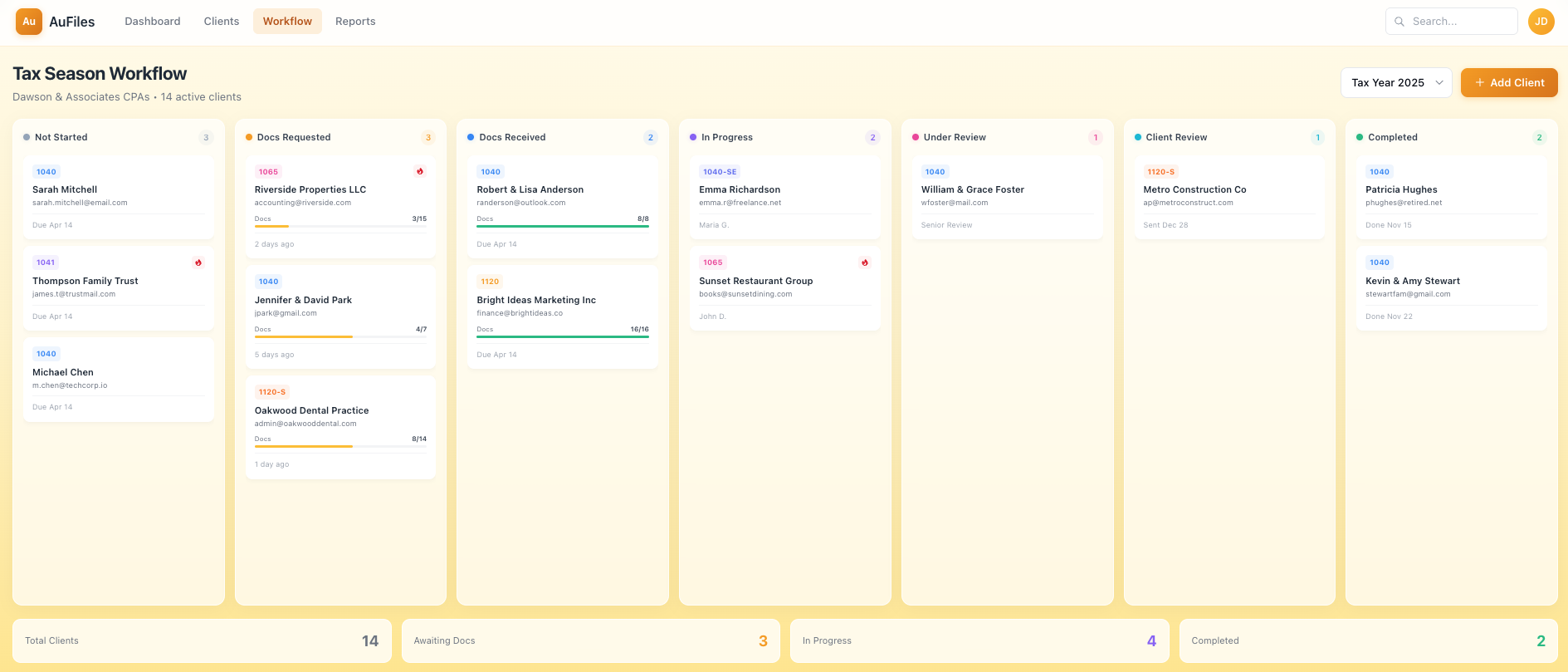
All of that complexity surfaces through a simple Kanban-style interface. Seven columns representing the stages every return moves through:
Not Started → Docs Requested → Docs Received → In Progress → Under Review → Client Review → Completed
Each client is a card, color-coded by form type. 1040s look different from 1065s look different from 1120-Ss. Document progress bars show what's been received versus what's expected. Due dates. Alert flags for anything needing attention.
The firm owner glances at four numbers at the bottom: Total Clients, Awaiting Docs, In Progress, Completed. That's enough to understand capacity and spot bottlenecks.
The board is the tip of the iceberg. Behind every card drag, the orchestration engine is updating statuses, triggering notifications, logging audit trails, and syncing with integrated systems.
Four weeks, not eighteen months
We started with whiteboard sketches. Four weeks later, the system was processing real client documents.
This wasn't a rushed MVP with technical debt we'd regret. It was focused execution: clear requirements, experienced team, modern tooling, and the discipline to build exactly what was needed. Nothing more, nothing less.
Enterprise systems don't have to take eighteen months and cost seven figures. They take that long when scope creeps, decisions stall, and teams build for hypothetical future requirements instead of actual current needs.
We built for the tax season that was coming, not for every possible future scenario. The system is extensible, but we shipped something that works first.
What we'd do differently
More user testing before the handoff. We built exactly what the firm asked for, but we underestimated how much staff training would matter. A few more sessions watching people use the system would have caught some UX friction points earlier.
Earlier integration testing with their existing tools. We knew which systems we needed to connect to, but we didn't get access to their sandbox environments until week three. Starting that earlier would have smoothed the final push.
Built the reporting dashboard in parallel. The workflow board was the priority, and we shipped it. But the firm owner wanted analytics views we punted to phase two. In retrospect, a basic dashboard wasn't scope creep. It was core functionality we should have included.
None of these were fatal. The system shipped, it works, and the firm used it through tax season. But we're honest about where we could have been sharper.
The real lesson
80% delivered is 0% value. The firm didn't need a perfect system. They needed a complete one before tax season started. We shipped document classification, data extraction, workflow automation, client communications, and audit logging. All of it working. All of it in production.
Timeline discipline isn't about working faster. It's about scope discipline: building exactly what's needed, not what might be needed someday. The difference between four weeks and eighteen months is usually not the engineering. It's the decision-making.