← Durable Code · Chapter 06
Claude Code: A Crash Course
Treat Claude Code as a black box and the practices in this book become superstition, the rituals done without knowing what they are for. This is a short tour of what the tool does underneath, enough of a mental model that the rest reads as obvious rather than arbitrary. I use Claude Code because it is what I use; most of what follows has analogues in other tools under other names. The syntax moves quickly. The categories are steadier.
The model is stateless
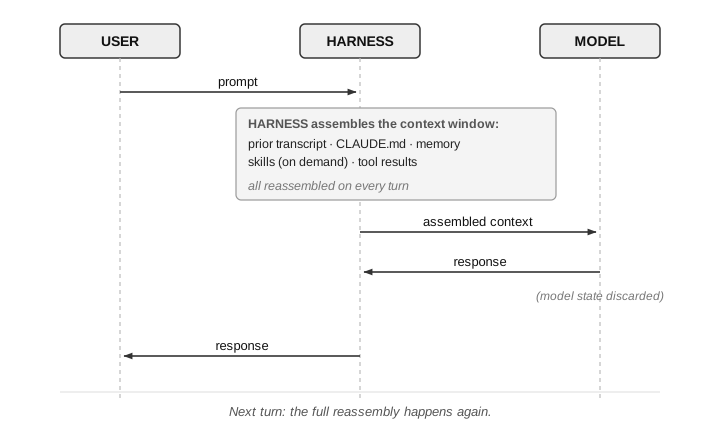
The model remembers nothing between calls. Each request reaches it as the first thing it has ever seen, with no trace of the one before. The conversation you seem to be having is not held by the model.
The harness reassembles the context window
The layer around the model, what Anthropic calls the agentic harness, does the remembering. On every turn it assembles a window of text, the context window, holding your earlier prompts, its earlier replies, the files it has read, the results of the tools it has run, and its system instructions, and sends the whole thing back in. The model reads that transcript and writes the next line. It can see what the window holds and nothing else; anything not in it does not exist for that turn.
Durable things live on disk
Because the model holds nothing, nothing about your project lives in the model. Replace it tomorrow with a more capable one and the project works exactly as well, or as badly, as it did yesterday. What persists is on disk, and the harness loads it back each session. Some of those files are surfaces Claude Code knows by name, each tuned for a different kind of thing. The rest are ordinary files the agent reads like any other: the source, the tests, and whatever notes you keep, say a docs/ folder of requirements and decisions you point the agent at. The tool has no built-in notion of that folder; it reads the file because you said to. Using the tool well is mostly knowing which surface fits which kind of thing.
| Surface | What it is | When it loads | Who edits it |
|---|---|---|---|
CLAUDE.md | Per-project constitution | Every session | Human |
| Path-scoped rules | Instructions for part of the tree | When matching files are read | Human |
docs/ | Your own notes folder: a convention, not a built-in | When the agent reads them | Both |
| Code & tests | The system itself: ordinary files the agent reads | On demand | Both |
| Hooks | Event-triggered commands | On the event | Human |
| Auto memory | What the agent learned about the project | When relevant | Agent |
| MCP | Live connection to external systems | On demand | Human |
CLAUDE.md
Instructions you never want forgotten go in a CLAUDE.md at the project root. The harness loads it into the context window at the start of every session, so it acts like part of the system prompt the model sees on every turn. The layer is hierarchical: your personal preferences, the team’s shared rules, and project-local notes stack together, and a rule can be scoped to fire only when certain files are read. Keep each file small. A CLAUDE.md that sprawls gets skimmed, by the model the same way it would by a person, and the rules that mattered get diluted by the ones that did not.
Memory
Where CLAUDE.md is the document you write for the model, the memory Claude Code calls auto memory is the one it writes for itself. The harness keeps it per project as small files on your machine, one per topic, with an index that loads at the start of a session and the rest pulled in when the conversation makes them relevant. It records facts about you, feedback you have given, project facts not visible in the code, and pointers to outside resources. CLAUDE.md is for what the model must honor every turn; auto memory is for what it may need later.
Skills
A skill is a capability the agent does not carry by default but loads when a situation calls for it. When the description in its frontmatter matches the work, the agent pulls its instructions into the window for that stretch and drops them after. This keeps the default context small: a practice that applies only sometimes can live as a skill instead of adding weight to the CLAUDE.md every session.
Hooks
A hook runs a command at a fixed point in a session, such as before or after the agent uses a tool, when a session starts, or when you submit a prompt. The command can let the action proceed, block it with a reason the agent sees, or add information to the context the agent works from. Hooks are where you make a rule mechanical instead of hoping the model remembers it. Choosing a hook over a prompt is a question of how much a miss costs, which is the subject of Probabilistic to Deterministic.
Subagents
A subagent is a named agent that runs in its own context window, defined in a small Markdown file that says when it applies and which tools it may use. It sees what you give it, not the whole parent conversation, and its system prompt can point it at one viewpoint: a security reviewer, a debuggability reviewer, a product critic. This is how you summon back a viewpoint Role Collapse folded into one engineer, at the moment a change is being made. Each subagent spends its own tokens, so you reach for them on purpose, not on every diff.
Plan mode
In plan mode the agent reads, explores, and runs commands that change nothing, then proposes a plan in text. You agree, disagree, or redirect before it writes a line. It is the cheapest way I know to catch the agent building the wrong thing confidently, because a misunderstanding is far cheaper to fix in a short plan than in a long diff. For non-trivial work, set it as the default so every session starts there.
MCP
Out of the box the agent works with your files and your shell. The Model Context Protocol, an open standard Anthropic introduced, connects other systems, a database, an issue tracker, a deploy platform, a running browser, as tools the agent can call. Where a notes folder is a static capture, an MCP connection is live: the agent can query the database as it stands now and drive the app as it is running. The edge of what it can reach is something you set on purpose.