Your Cloud Budget Is a Leaky Bucket. Here's How to Plug It.
Catch cost overruns before a single resource is created
Cloud cost surprises follow a predictable pattern. Someone requests a resource. It gets approved based on a rough estimate or no estimate at all. The resource deploys. A month later, finance asks why the bill is 3x what anyone expected.
By then it's too late. The resource is in production. Users depend on it. Rightsizing means downtime and change management. The "temporary" overspend becomes permanent.
The fix isn't better monitoring after deployment. It's catching the problem before anything gets created.
This article walks through how to build cost estimation into your provisioning pipeline, so requests that exceed approved budgets fail before they deploy, not after they bill.
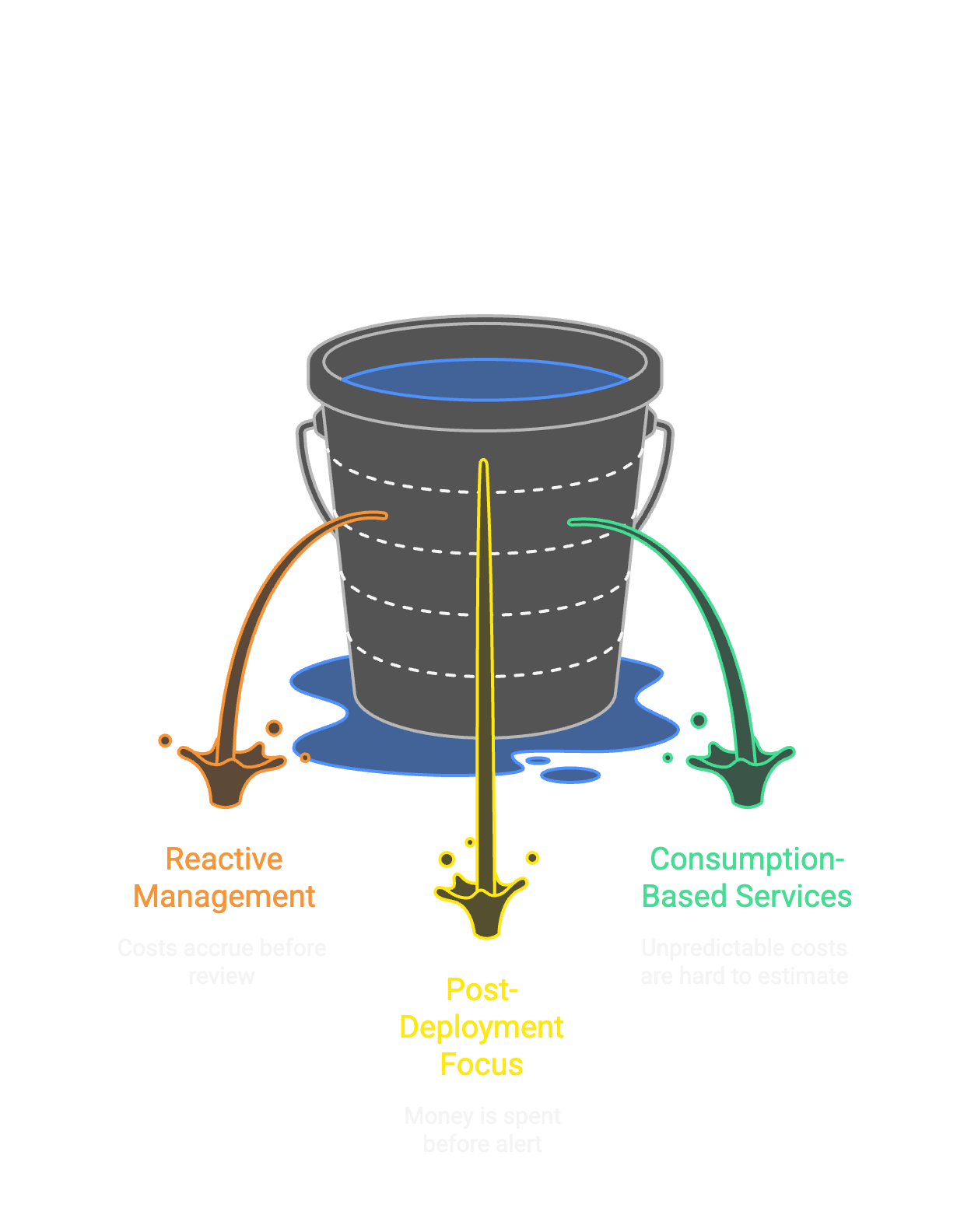
Why alerts after deployment are too late
Most organizations approach cloud costs reactively:
- 1. Resources deploy
- 2. Costs accrue
- 3. End of month, someone looks at the bill
- 4. Surprised faces
- 5. Scramble to identify what's expensive
- 6. Maybe rightsize, maybe just accept it
Azure Cost Management, AWS Cost Explorer, and third-party FinOps tools all help with steps 3-6. They're good at showing you what you've already spent. They can alert you when budgets are exceeded. They can identify waste.
But they all share one limitation: they operate after the money is spent.
By the time you get an alert that a budget threshold was crossed, the resources are running, the costs are accruing, and unwinding requires work that often doesn't happen.
The earlier you catch it, the cheaper to fix
The same principle that drives security ("shift left") applies to cost management. The earlier you catch a problem, the cheaper it is to fix.
| Stage | Cost to Fix |
|---|---|
| Request time | User adjusts request, no resources created |
| Pipeline validation | Pipeline fails, no resources created |
| Post-deployment | Downtime, change management, user disruption |
| Month-end review | Political capital, budget overrun already recorded |
The goal is to catch cost problems at request time or pipeline validation. Before any resources exist.
Three steps: estimate, compare, gate
The approach has three parts:
- 1. Estimate costs from infrastructure code before deployment
- 2. Compare the estimate to an approved budget passed from the request system
- 3. Fail the pipeline if the estimate exceeds the budget
The key enabler is that modern Infrastructure as Code is parseable. If you have a Terraform plan or Bicep template, you can calculate what it will cost before you run apply.
Infracost: The practical choice
Infracost is an open-source tool that estimates cloud costs from Terraform (and now OpenTofu, Terragrunt, and Bicep via a wrapper). It's free, actively maintained, and used widely enough that it's battle-tested.
How it works:
- 1. You run
terraform planand save the plan file - 2. Infracost parses the plan file
- 3. Infracost pulls current pricing from the cloud provider's pricing API
- 4. Infracost outputs an estimated monthly cost
No cloud credentials are sent to Infracost. The pricing lookup happens locally or through their API, but your infrastructure code and state stay on your systems.
Example output:
Project: my-terraform-project

 Name                                     Monthly Cost
 ─────────────────────────────────────────────────────
 azurerm_linux_virtual_machine.main       $138.70
 azurerm_managed_disk.data                 $19.20
 azurerm_public_ip.main                     $3.65
 ─────────────────────────────────────────────────────
 OVERALL TOTAL                            $161.55
For most Azure resources, the estimates are accurate within a few percent of actual billing. Some resources with consumption-based pricing (Functions, Logic Apps, Cosmos RUs) are harder to estimate, but the major cost drivers (VMs, storage, databases) are well-supported.
Where this fits in your pipeline
Here's how this fits into a provisioning pipeline:
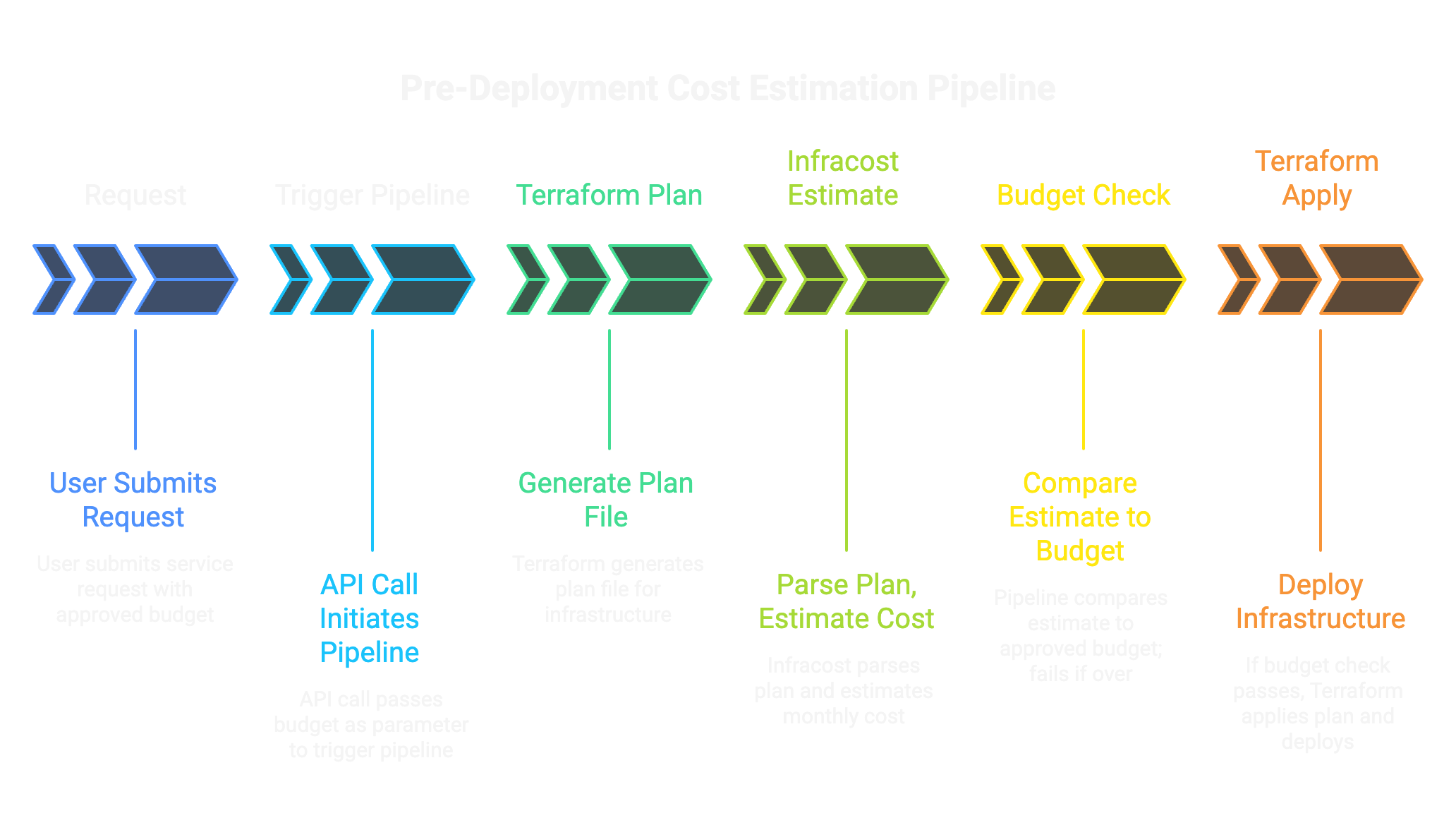
The critical point: the budget comes from the request system, not from the pipeline. When a user submits a request and a manager approves it, that approval includes a dollar amount. The pipeline just enforces it.
The code: four steps in Azure DevOps
In Azure DevOps or GitHub Actions, this is a few steps:
1. Accept budget as a pipeline parameter:
parameters:
  - name: approved_budget
    type: string
2. Run Terraform plan:
- script: terraform plan -out=tfplan
  displayName: 'Terraform Plan'
3. Run Infracost:
- script: |
    infracost breakdown --path=tfplan --format=json > infracost.json
  displayName: 'Estimate Costs'
4. Compare and gate:
- script: |
    ESTIMATED=$(jq '.totalMonthlyCost | tonumber' infracost.json)
    APPROVED=${{ parameters.approved_budget }}
    if (( $(echo "$ESTIMATED > $APPROVED" | bc -l) )); then
      echo "##vso[task.logissue type=error]Estimated cost \$$ESTIMATED exceeds approved budget \$$APPROVED"
      exit 1
    fi
  displayName: 'Budget Gate'
If the estimate exceeds the approved budget, the pipeline fails with a clear message. No resources deploy. The request goes back to the user to either adjust the configuration or get additional budget approval.
Show the cost before they click submit
The pipeline gate is the enforcement mechanism. But ideally, users know the cost before they submit, so they don't waste time on requests that will fail.
Two approaches:
Option A: Pre-Computed Lookup Table
Run Infracost offline for each catalog offering at various configurations (VM sizes, storage tiers, regions). Store the results in a table. When the user selects options in the catalog form, look up the estimate and display it.
Pros: Fast (instant lookup). No external calls during request.
Cons: Estimates can drift if not refreshed regularly (monthly is usually fine). Only works for pre-defined configurations.
Option B: Real-Time Microservice
Build a small API (Azure Function, container) that accepts configuration parameters, runs Infracost on a template, and returns the estimate.
Pros: Always current pricing. Works for any configuration.
Cons: More infrastructure to maintain. Slower (5-10 seconds per estimate).
For most organizations, Option A is sufficient. Pre-compute estimates for your catalog offerings, refresh monthly, and display on the form. Users see what they're asking for before they submit.
Let business decide, let pipeline enforce
The request system (ServiceNow) owns approval routing. Different cost thresholds trigger different approval chains:
| Estimated Cost | Approval Required |
|---|---|
| Below $500/month | Auto-approved (or manager only) |
| $500-$2,000/month | Manager approval |
| Above $2,000/month | Manager + Finance approval |
These thresholds are configured in ServiceNow, not the pipeline. The pipeline just enforces whatever budget was approved.
This separation matters. If Finance approves a $5,000/month request, the pipeline doesn't second-guess that decision. It deploys. The pipeline gate exists to catch mistakes: requests where someone fat-fingered a VM size or forgot to account for storage costs. It's not there to override business decisions.
Consumption-based services: estimate, don't guess
Some cloud services don't have predictable monthly costs:
- Azure Functions: billed per execution
- Cosmos DB: billed per RU consumed
- Logic Apps: billed per action
- Event Grid: billed per event
Infracost handles these by letting you specify expected usage:
# infracost-usage.yml
resource_type_default_usage:
  azurerm_cosmosdb_account:
    monthly_request_units: 1000000
For resources with highly variable consumption, you have a few options:
- 1. Estimate based on historical usage for similar workloads
- 2. Use a high estimate and treat it as a ceiling
- 3. Flag for additional review rather than auto-calculating
The goal isn't perfect accuracy. It's catching the obvious problems: someone requesting a 64-core VM when they meant 4-core, or forgetting that premium storage costs 10x standard.
Post-deployment still matters, differently
Pre-deployment estimation doesn't replace post-deployment cost management. You still need:
- Azure Cost Management for actual spend tracking
- Budget alerts for threshold notifications
- Anomaly detection for unexpected spikes
- Tagging enforcement for cost attribution
But now these tools serve a different purpose. Instead of discovering surprises, they're validating that reality matches estimates. If actual costs diverge significantly from estimates, that's a signal to investigate and update your estimation baselines.
The full stack: request to reconciliation
| Stage | Tool | Purpose |
|---|---|---|
| Request time | Catalog lookup | Show estimate before submission |
| Approval | ServiceNow workflow | Route by cost threshold |
| Pipeline | Infracost + budget gate | Fail if estimate exceeds approval |
| Post-deploy | Azure Cost Management | Track actual spend |
| Ongoing | Budget alerts, anomaly detection | Catch drift and surprises |
Find out before the resources exist
Pre-deployment estimation is the piece most organizations are missing. It's not hard to implement. Infracost is free, the pipeline logic is straightforward, and the payoff is immediate.
Stop finding out about cost overruns at month-end. Find out before the resources exist.